


When email is the primary target for attackers, it’s no surprise that phishing, spoofing, and impersonation are hitting inboxes hard. Even with robust protocols like SPF, DKIM, and DMARC in place, recipients often struggle to distinguish legitimate messages from malicious ones.
Mark Certificates fill that critical gap, turning authentication into brand visibility. Think of them as the digital equivalent of a wax seal, an unmistakable mark of authenticity that tells your customers, “This message is truly from us.”
What is a Mark Certificate?
A Mark Certificate is an authoritative digital certificate that allows organizations to display their official logo directly in email inboxes that support the BIMI (Brand Indicators for Message Identification) standard.
There are two main kinds of Mark Certificates: Verified Mark Certificates (VMCs) or Common Mark Certificates (CMCs). Each type has different requirements but overall, both largely do the same thing, protect your brand and authenticate your email communications.
It’s not just about aesthetics; it’s about trust. When recipients see your verified brand logo next to your message, it creates an instant visual cue that the email is legitimate, authenticated, and safe to engage with. Mark Certificates are issued only to domains that have properly implemented and enforced DMARC policies, ensuring that your brand is protected from spoofing and impersonation.
How Do Mark Certificates Work?
To understand how Mark Certificates work, it helps to look at the broader email authentication ecosystem. SPF, DKIM, and DMARC are the technical backbone. They validate that your messages are coming from authorized servers and haven’t been tampered with. BIMI is the standard that enables logos to appear in inboxes. And the Mark Certificate? It’s the certificate that proves your logo is legitimate and tied to a domain that meets strict authentication requirements. In short, BIMI provides the framework, and a Mark Certificate is the official stamp of approval.
Here’s how it all comes together. First, your domain must be configured with SPF, DKIM, and DMARC, with DMARC set to either “quarantine” or “reject.” Next, you’ll need a SVG version of either your trademarked logo for VMC, or your logo that you have used for at least 12 month that meets BIMI specifications. Once these prerequisites are in place, a trusted Certificate Authority such as GlobalSign can issue your Mark Certificate. From there, your verified logo will begin appearing in supported inboxes—Gmail, Apple Mail, Yahoo, and others—giving your emails a powerful visual trust signal.
What is the Difference Between Verified Mark Certificate (VMC) and Common Mark Certificate (CMC)?
The main distinction between a VMC and a CMC is the requirements for them and the level of authentication they display.
A Common Mark Certificate offers the simplest path to displaying your brand logo in inboxes that support BIMI. Unlike Verified Mark Certificates, CMCs do not require a registered trademark, only that the logo has been used for at least 12 months, making them a great option for small or emerging organizations that want to start building visual trust in email without the legal or administrative hurdles of trademark verification. While CMCs still depend on having SPF, DKIM, and a DMARC policy in place, they provide a foundational level of trust rather than full brand validation.
A Verified Mark Certificate, on the other hand, represents the highest standard of authentication and brand integrity. To qualify for a VMC, your organization must own a legally registered trademark for the logo you plan to display, and your domain must enforce DMARC with a “quarantine” or “reject” policy. Before issuance, a trusted Certificate Authority such as GlobalSign verifies both your trademark ownership and organizational identity. The result is a certified trust signal, your verified logo displayed alongside a blue verification tick in inboxes like Gmail, Apple Mail, and Yahoo. This tells recipients your message is genuine and your brand is legitimate.
In short:
- CMC: No trademark required, easier to obtain, foundational level of visual trust.
- VMC: Trademarked logo required, higher verification standards, stronger verification through a blue verified tick.
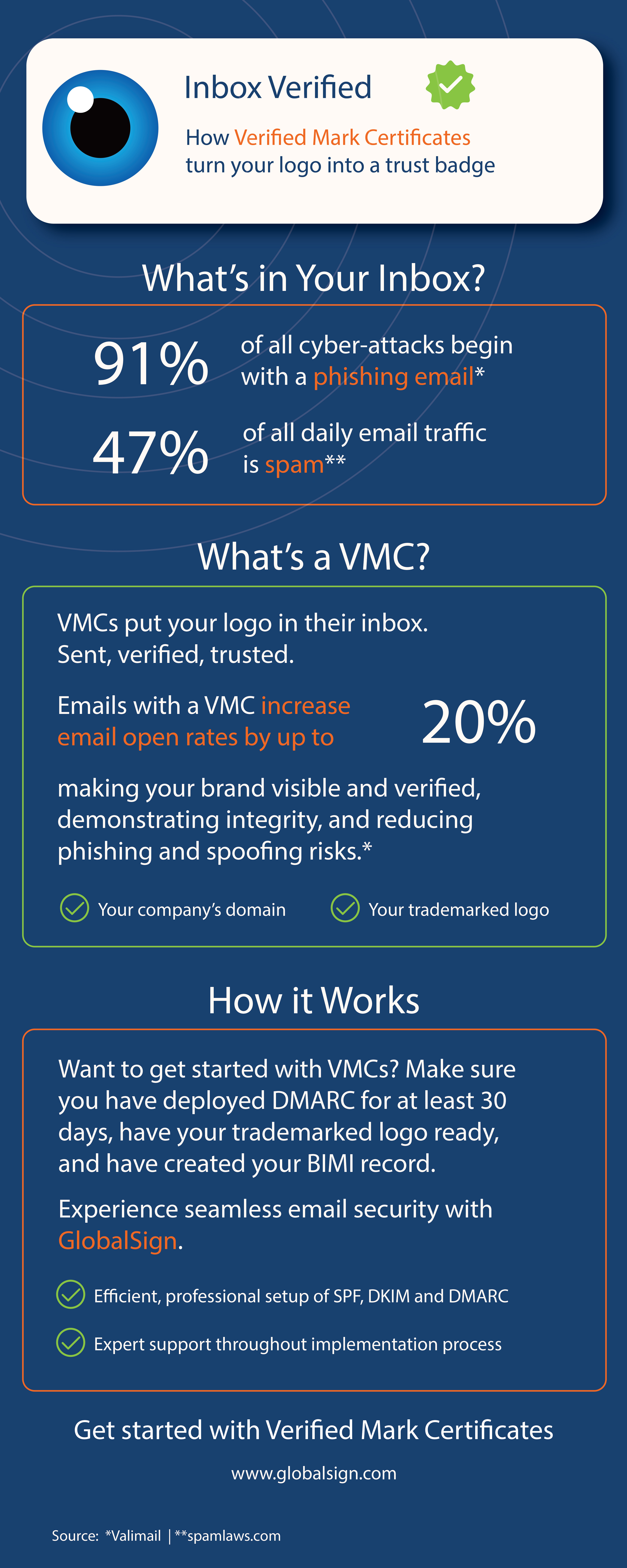
If your organization is ready to showcase verified brand trust in every inbox, a VMC is the next step, and the infographic below breaks down exactly how it works.
Why Mark Certificates Matter to Your Business
The benefits of Mark Certificates go far beyond brand aesthetics. They help protect your organization from phishing and spoofing attacks by making it harder for bad actors to impersonate your brand. They build instant credibility with recipients, increasing the likelihood that your emails will be opened, read, and acted upon. And they support compliance with evolving email security standards, especially as major providers, such as Google and Yahoo, continue to tighten requirements around DMARC enforcement and sender transparency.
What’s the Difference between Mark Certificates and BIMI?
It’s essential to clarify the distinction between BIMI and Mark Certificates, as the terms are often used interchangeably. BIMI is the technical standard that enables logos to be displayed. A Mark Certificate is the certificate that verifies your logo’s authenticity and ties it to a properly authenticated domain. Without a Mark Certificate, your logo won’t appear in most major inboxes, even if you’ve implemented BIMI correctly.
What You Need Before Getting a Mark Certificate
Before you can get a Mark Certificate, there are a few key requirements to check off.
- Your domain must have SPF, DKIM, and DMARC fully configured, with DMARC set to enforce policy.
- You’ll need either a trademarked logo for VMC or a logo that you have been using for 12 months for CMC, in SVG format, that meets BIMI standards.
- For a VMC, trademark registration is mandatory; VMCs are only issued to legally recognized brand assets.
Step-by-Step – How to Get Your Logo Displayed with a Mark Certificate
1. Lock Down Your Email Authentication
- Before your logo can show up in inboxes, your domain needs to prove it’s trustworthy. That means setting up SPF, DKIM, and DMARC correctly. Think of this as your email’s security foundation—without it, BIMI and Mark Certificates won’t work.
2. Get Your Logo Ready for Prime Time to Meet BIMI Standards
- It should be in SVG format, clean, and square. This ensures it renders consistently across supported email clients.
3. Publish Your BIMI Record Once Your Logo is Ready
- Add a BIMI TXT record to your domain’s DNS. This tells email providers where to find your logo and confirms you're serious about authentication.
4. Secure a Mark Certificate If Your Logo Needs Extra Validation
- Apply for a Mark Certificate from a trusted certificate authority like GlobalSign. This authenticated certificate proves your logo belongs to your brand—and unlocks display in inboxes that require it.
How to Get a Mark Certificate With GlobalSign
As a trusted Certificate Authority with deep expertise in email authentication, GlobalSign guides you through every step; from verifying your domain and logo to ensuring compliance with BIMI and DMARC requirements. Our support doesn’t stop at issuance. We’re committed to helping you maintain trust and visibility across your email ecosystem.
In today’s threat landscape, email trust is essential. A Mark Certificate from GlobalSign gives your brand the visibility, credibility, and protection it needs to stand out in crowded inboxes and stay ahead of attackers. SPF, DKIM, and DMARC lay the foundation, but Mark Certificates elevate your email strategy to a new level of trust and engagement.
Want your logo to appear in customers' inboxes as a verified trust signal? GlobalSign’s Mark Certificates make it possible.
Learn how to secure your verified brand logo within inboxes today